WordPress Security Beyond Plugins: 7 Critical Server-Level Protections That Matter
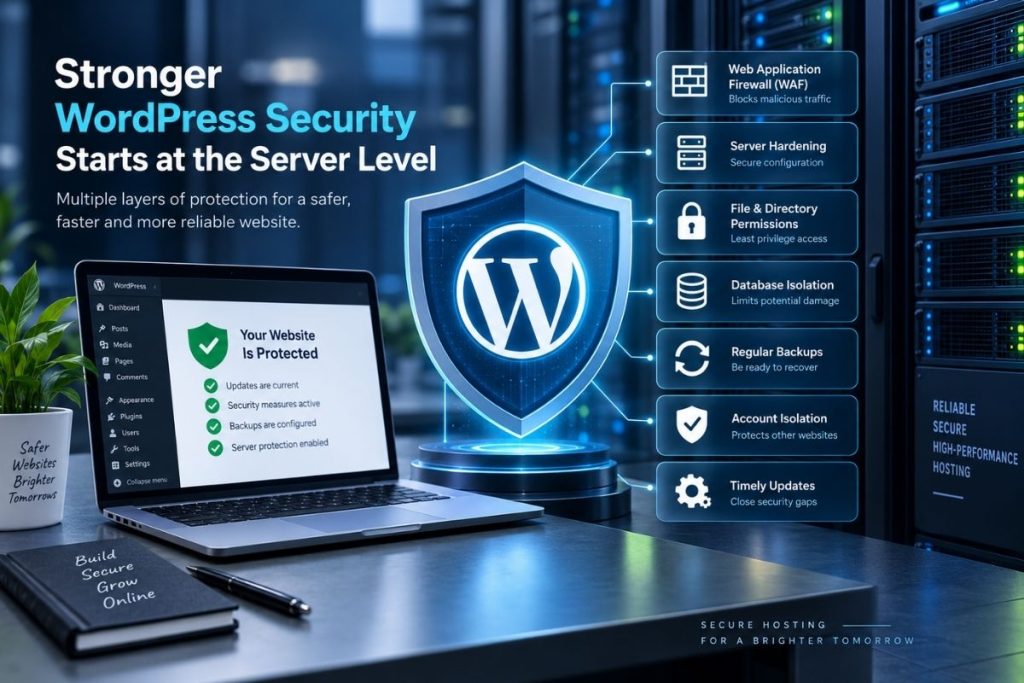
A security plugin can block suspicious logins, scan files and alert an administrator when something changes. But it only sees the WordPress side of the problem.
WordPress Server Security also depends on what happens before a request reaches WordPress: the web server, PHP, filesystem permissions, database access, firewall rules, account isolation and the backups available if something goes wrong.
This distinction matters because neither layer can replace the other. A server firewall cannot repair a vulnerable plugin, and a WordPress plugin cannot compensate for unsafe file permissions or a poorly maintained hosting environment.
The useful question is therefore not “Which security plugin is best?” but “What happens if one layer fails?”
WordPress Server Security Starts Before WordPress Loads
Consider a malicious request targeting a known plugin vulnerability.
If that request reaches PHP and WordPress, the application itself has to deal with it. A server-level Web Application Firewall, or WAF, gets an earlier opportunity to inspect the request and potentially reject it before the vulnerable code executes.
On cPanel servers, ModSecurity can provide this layer of filtering. The OWASP ModSecurity Core Rule Set contains rules designed to detect common attack patterns and can sometimes block exploitation even when the application itself has not yet been patched.
cPanel’s OWASP ModSecurity CRS documentation also makes an important point: these rules improve protection, but they do not make the server impervious to attack.
A WAF Can Be Right and Still Break a Legitimate Request
Security controls create trade-offs.
Imagine a WordPress contact form suddenly starts returning 403 Forbidden after a ModSecurity ruleset is updated. The quick fix would be to disable ModSecurity for the whole domain.
That may restore the form, but it removes a much larger layer of protection than necessary.
A better investigation is narrower:
- Confirm that ModSecurity generated the block.
- Identify the rule that matched the request.
- Check whether the request is genuinely legitimate.
- Determine whether the problem affects one endpoint or the entire site.
- Exclude or adjust only the rule or request that needs it.
False positives are a real consideration. cPanel’s OWASP documentation even includes exception rules specifically intended to reduce legitimate traffic being incorrectly blocked.
This is a good example of mature security practice: do not remove a protection simply because it created one operational problem.
File Permissions Should Be Restrictive, Not Convenient
WordPress needs write access in some places, particularly for media uploads and updates. That does not mean the entire installation should be broadly writable.
WordPress documents a common permission pattern of 755 for directories and 644 for files. The exact setup still depends on ownership, the PHP handler and the hosting environment, but the principle is consistent: give processes only the access they need.
Changing a directory to 777 because an upload or update fails may remove the immediate permission error, but it can also create far more write access than intended.
The official WordPress file permissions guide specifically warns about overly permissive settings and recommends finding a safer configuration rather than treating 777 as a shortcut.
An Administrator Login Should Not Automatically Mean PHP Editing
If an attacker gains access to a WordPress administrator account, the built-in theme and plugin file editors can provide a direct route to modifying executable PHP.
WordPress provides a simple way to remove that capability:
define( 'DISALLOW_FILE_EDIT', true );This does not make a compromised administrator account harmless. An attacker may still have other methods of changing files or installing malicious software.
Its value is containment. One useful path to modifying PHP disappears.
WordPress itself notes that this setting adds an extra layer of protection if a highly privileged account is compromised.
Updates Matter, but Blind Updates Are Not a Security Strategy
Keeping WordPress core, plugins and themes current is one of the most important security practices because publicly known vulnerabilities become easier to target once technical details are available.
That does not mean every production website should update everything without testing.
A brochure site may tolerate automatic updates with little concern. A WooCommerce store with custom checkout logic or a heavily customized site may need backups, staging and a controlled update process.
The security objective is not “update at any cost.” It is to reduce the period during which known vulnerable software remains exposed without creating avoidable operational failures.
Database Separation Limits the Blast Radius
If several WordPress sites share a server, they do not need to share one database user with broad access to everything.
WordPress recommends separate databases and database users as a containment strategy when multiple installations are hosted together. If one site is compromised, that separation makes it harder for the same credentials to be used against unrelated databases.
There is another nuance here. It is possible to reduce database privileges aggressively, but WordPress warns that plugins, themes or major updates may need permissions such as ALTER when they change the database schema.
Hardening that breaks upgrades is not automatically better security. Privilege changes should be understood and tested rather than copied from a checklist.
Backups Need to Survive the Compromise
A backup stored only inside the same hosting account is useful for accidental deletion. It is less reassuring if an attacker who compromises the account can also alter or delete every available backup.
A stronger recovery plan includes both the WordPress files and the database, keeps more than one restore point and stores at least some recovery data separately from the live installation.
That separation matters when a compromise is discovered late. If malware was introduced ten days ago, yesterday’s backup may simply contain the same compromised files.
WordPress explicitly treats files and databases as separate parts of a complete backup. Our guide to website backup responsibilities looks at that issue in more detail.
Isolation Matters on Shared Hosting
Shared hosting introduces another question: if one customer account is compromised, how much of the rest of the server can it see?
Filesystem permissions and account separation create part of that boundary. Technologies such as CloudLinux CageFS can add another layer by placing individual hosting users inside separate virtualized filesystem environments.
This does not fix a vulnerable WordPress plugin. It reduces the potential blast radius.
A compromised site should not automatically become a route to browsing files belonging to unrelated customers on the same machine.
This is why hosting security should be evaluated beyond the list of WordPress plugins installed on a site.
SSL Is Encryption, Not Proof That WordPress Is Secure
A valid SSL certificate protects data while it travels between the visitor and the server. That is essential, but it says very little about whether the application itself is vulnerable.
A WordPress site can show a perfectly valid HTTPS padlock while still running an outdated plugin with a serious security flaw.
Our guide to what website owners get wrong about SSL certificates explains why HTTPS should be treated as one security layer rather than a complete security assessment.
The Practical Test: What Happens When One Layer Fails?
The strongest WordPress security model is layered.
If a vulnerable request reaches the server, a WAF may stop it before WordPress executes the code. If administrator credentials are stolen, disabling dashboard file editing removes one route to PHP modification. If an application is compromised, account and database isolation can reduce the damage. If the site still has to be rebuilt, a clean backup provides a recovery path.
None of those controls is perfect on its own.
Good WordPress Server Security is therefore less about finding one product that “secures WordPress” and more about making sure one failure does not automatically become a complete compromise.
Reliable Hosting for a Seamless Online Experience
24/7 Support & High Performance – Host with Confidence

Boost Your Online Presence with Host Home: Unmatched Hosting Power, Anytime, Anywhere.
Contact us
© 2026 hosthome.cloud. All Rights Reserved.